Data snapshots: 8 August to 9 October 2026, and a full recheck on 19 October 2026.
If you see URL is unknown to Google next to your pages, it can feel like the worst possible verdict. You wrote the article, published it, and Google apparently has no idea it exists. A real example: on Beeznez Tech, the Index Status tab in Rank Math showed 63 of the 68 inspected pages with that label. A full recheck on 19 October showed that this can start to change quickly, and I show both sets of numbers below.
Below you will find what the status means, the real numbers from that example site, the technical checks to run to make sure nothing is blocking Google, and six steps to get new pages discovered. I also explain what this means for ranking, because it changes how you should think about keywords.
What I Tested vs What I Researched
Tested: The index-status figures come from my own site, Beeznez Tech, as recorded in Rank Math’s Index Status tab (a first snapshot from 8 August to 9 October 2026 and a full recheck on 19 October 2026), and from the technical checks I ran on 21 October 2026.
Researched: Google URL Inspection documentation and published analysis by Indexing Insight on how the label behaves.
Not tested: I have not yet measured which of the six fixes below speeds up indexing on my site. I plan to recheck in about two weeks and report the result here.
What Does “URL Is Unknown to Google” Mean?
It is a page status in Google Search Console’s URL Inspection tool. According to Google’s own URL Inspection documentation, it means Google has not seen that URL before. Google’s suggested fix is to run a live inspection, check that the page is available, and then submit it for indexing.
The status is not a penalty. It says nothing about the quality of the page or any rule you broke. It simply describes where the page sits in Google’s pipeline: not yet discovered. Rank Math shows the same wording in its Index Status tab because it reads the information from Google’s inspection data.
One caution: some SEO researchers argue that this label is not always accurate. An analysis by Indexing Insight reports that pages Google had seen before can also show it. So treat the label as a strong signal that a page has little standing with Google right now, not as proof that Google has never touched it.
URL Is Unknown to Google: What Rank Math Data Looks Like (Real Example)
Rank Math’s analytics screen already hinted at the problem. When I first wrote this article on 10 October, my Analytics dashboard showed an overall optimization score of 87, with 101 pages rated good, 2 fair and none poor. But it also showed total impressions as n/a, total keywords as n/a, and zero keywords in every position bucket. Search traffic was 14 visits over the last 30 days, down 6.
The Index Status data explained why. The first column is the snapshot I took for this article, and the second is a full recheck of every live URL on 19 October 2026:
| Index status | First snapshot (8 Aug to 9 Oct) | Full recheck (19 Oct) |
|---|---|---|
| URL is unknown to Google | 63 | 21 |
| Discovered – currently not indexed | 4 | 46 |
| Crawled – currently not indexed | 1 | 0 |
| Submitted and indexed | 0 | 1 |
| Total inspected | 68 | 68 |
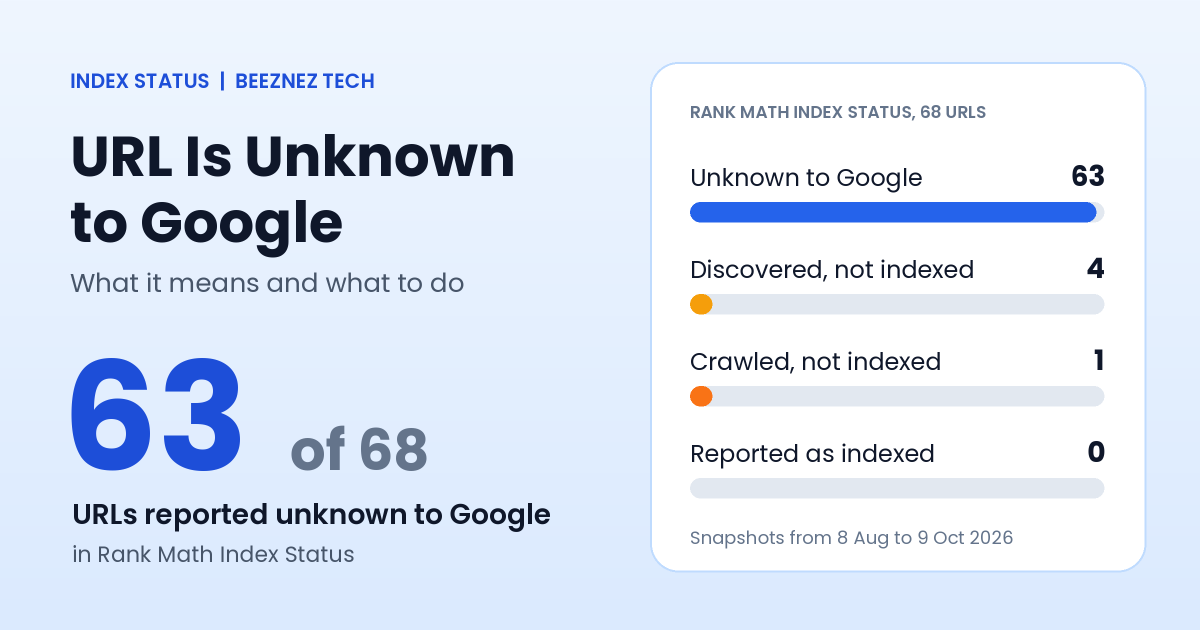
Rank Math Index Status results for the 68 URLs in my first snapshot.
Two details matter. First, the two columns are not a strict like-for-like comparison. The first was built from checks run on different days, and my site has changed since, so read the move from 63 to 21 as a direction rather than an exact measurement. The second column is one full recheck, so it is the better picture of where the site stands now. Second, the About, Contact, Terms and Disclaimer pages that were marked “Discovered – currently not indexed” back in August are still in that state: Google knows about them, but has not crawled them.
What has changed is that Google has started to pick up the site. Of the 68 live URLs I checked, 47 are now known to Google, and one page is indexed: my AI automation tool buyer’s guide, which Google last crawled on 18 October. Of the 21 URLs still unknown, 11 were published between 14 and 19 October, so they are simply new. Four live URLs had not been checked yet when I ran this recheck.
My Search Console connection itself was healthy. Rank Math reported the property as verified and the sitemap as detected. Yet the table of Search Console query data inside Rank Math contained zero rows. That is why impressions and keywords showed n/a: Google had not returned any search data because, as far as I can tell, the pages were not yet appearing in search results.
How to Find Out If a URL Is Unknown to Google in Rank Math
You can see this status without leaving WordPress. Open Rank Math SEO, go to Analytics, and choose the Index Status tab. For it to work, your Google account must be connected, your Search Console property must be verified, and the index status option must be switched on in Rank Math’s analytics settings. Rank Math then asks Google about your URLs and stores the answer for each one.
Look at the date of each check as well as the status. Mine had been run on several different days, so a page showing that a URL is unknown to Google in an August snapshot may have changed since. For a final answer on any single page, paste it into the URL Inspection tool in Search Console, which reads Google’s current data.
Why This Matters More Than Your SEO Score
My pages scored well. When I first checked, Rank Math rated 101 of 103 items as good, and the average Rank Math score across my 63 published posts is now 88.6. I wrote about this gap in my article on Rank Math Free vs PRO. An SEO score checks on-page basics. It cannot make Google discover a page. For the related question of getting mentioned by AI search tools, see Generative Engine Optimization (GEO) Explained.
This is also why picking a keyword does not help on its own. A page that Google has not indexed cannot rank for any keyword at any position, however well it is optimized. Indexing comes first, ranking second. On my site, the keyword positions stayed at zero not because the keywords were wrong, but because there was nothing in the index to rank.
Technical Checks: Is Anything Blocking Google?
Before blaming Google, check whether your own site is getting in the way. Here is what to verify:
| Check | Result on the example site |
|---|---|
| WordPress search engine visibility | Not blocked (the discourage setting is off) |
| Robots meta tag on an article | follow, index |
| Canonical tag | Points to the page’s own URL |
| Post sitemap | Loads normally with 64 URLs, newest updated 20 October |
| Posts set to noindex | 0 out of 63 published posts |
| Internal links on the homepage | 35 unique internal links |
I re-ran these checks on 21 October 2026. Nothing technical was stopping Google. Security headers do not decide indexing, but they belong on the same technical checklist; see WordPress security headers. That is useful, because it means the remaining cause is discovery and priority, not a mistake I need to undo. If you see URL is unknown to Google on a site that does have a noindex tag or a blocking rule, fix those first.
6 Fixes When a URL Is Unknown to Google
1. Rule out blockers first
Check the three things above: the site-wide visibility setting, the page’s robots meta tag, and the canonical URL. Also confirm the page loads with a normal 200 status and is not behind a login. This takes five minutes and prevents wasted effort.
2. Submit a clean sitemap
Your sitemap is how you list every page you want found. Submit it in Search Console following Google’s guide to building and submitting a sitemap, and make sure it lists only pages you actually want indexed. A sitemap helps discovery but does not guarantee indexing.
3. Inspect and request indexing for your key pages
Paste a priority URL into the URL Inspection tool, run the live test, and click Request Indexing. One request is enough. Repeating it does not speed anything up, and there is a daily limit, so use it on your best pages rather than all of them.
4. Link to new pages from pages Google already knows
Google finds most pages by following links. Add links from your homepage, your blog index and relevant older articles, as I did when I tidied my 404 errors and redirects. A page with no internal links is easy to ignore.
5. Give Google a reason to index each page
Pages that are discovered but not indexed are often thin or similar to others. Add something only you can offer: your own measurements, screenshots and opinions. This is the same standard I describe in my guide to E-E-A-T and AI content.
6. Earn discovery from outside, then be patient
Links and mentions from other sites help Google find you. After that, indexing can take days to weeks for a new site, and it is not guaranteed. Recheck the Rank Math Index Status tab and Search Console’s Pages report every week or two instead of daily.
A Note on Rank Math’s Instant Indexing
Rank Math includes an Instant Indexing module, and it is active on my site. As far as I know, it is built around IndexNow, a protocol that some search engines use but that Google does not take part in. So it should not be relied on to get a page into Google. Check the module’s current documentation before expecting it to replace a manual request in Search Console.
Common Mistakes
- Panicking about the label. It describes status, not punishment.
- Requesting indexing over and over. One request per URL is enough.
- Chasing keywords before indexing. An unindexed page cannot rank.
- Publishing thin pages quickly. More unknown URLs does not help. Fewer, stronger pages do.
- Trusting an old snapshot. Re-inspect the URL in Search Console before drawing conclusions.
- Blocking the site by accident. Check the visibility setting after any migration or staging work.
Quick Checklist
- Confirm the page loads and has no noindex tag.
- Confirm the canonical URL points to itself.
- Submit a clean sitemap in Search Console.
- Request indexing for your best pages, once each.
- Add internal links from your homepage and older articles.
- Improve thin pages with original data.
- Recheck Index Status every week or two.
Frequently Asked Questions
Is “URL is unknown to Google” bad?
It is not a penalty. It means Google has not discovered or does not yet recognize the page. For a new site, it is common.
How long until Google indexes a new page?
It varies from days to several weeks, and low-authority sites often wait longer. Google does not promise to index every page.
Should I request indexing for every URL?
No. Use the request for your most important pages and rely on your sitemap and internal links for the rest.
Why does Rank Math show n/a for impressions and keywords?
Those figures come from Search Console data. If Google has not shown your pages in search results, there are no impressions or keywords to display, even when the connection works.
Can I rank for a keyword if my URL is unknown to Google?
No. A page must be indexed before it can appear in results for any keyword.
How do I check if my page is indexed?
Paste the URL into the URL Inspection tool in Search Console for Google current answer, or open the Index Status tab in Rank Math, which stores the latest inspection result for each URL. Searching Google for the exact URL is the definitive test of whether it appears.
Does submitting a sitemap guarantee indexing?
No. A sitemap helps Google find your URLs, but it does not decide whether Google will crawl or index them. Link new pages from pages Google already knows, as in fix 4.
Should I use Rank Math Instant Indexing for Google?
Rank Math Instant Indexing is built around IndexNow, which Google does not take part in, so do not count on it to speed up Google. The details are in Rank Math Instant Indexing: Does It Work for Google?.
Final Thoughts on ‘URL is unknown to Google‘
When a URL is unknown to Google, the first job is not to optimize harder. It is to confirm nothing is blocking the page, help Google discover it, and give it a reason to be indexed. On my site, 63 of 68 inspected URLs were in that state on my first check while every on-page score looked healthy, which is a useful reminder that a green score and a ranking are two different things. By 19 October the picture had started to move: 21 URLs were still unknown, 46 had become “Discovered – currently not indexed”, and one page was indexed. Discovery is not the same as indexing, so the next question is how many of those 46 Google actually crawls. I will recheck in two weeks and add the result to this article.
Related reading: if you are wondering whether a plugin can speed this up, read Rank Math Instant Indexing: Does It Work for Google?. To make sure the pages you publish get discovered, see how I fixed orphan pages in WordPress with internal links. If you plan to run AdSense, also check that your ads.txt file is correct; see AdSense ads.txt in WordPress. Another file some sites publish for machines is llms.txt; see llms.txt in WordPress: Should You Enable It?. Security headers are a separate check; see WordPress Security Headers: How to Check Yours. For pages that return errors, see How to Fix 404 Errors in WordPress.