By Md Abdur Rouf Mia | Published 19 October 2026 | Server prices verified 18 October 2026, other figures 19 October 2026
The best self hosted SaaS alternatives can lower a startup’s monthly burn, but only in specific situations, and this guide tells you which ones. Most roundups list open-source tools and stop at the word “free”. That skips the costs that decide the outcome: the server, backups, email delivery and the hours someone spends keeping it all patched. Here are ten tools with their licences, their real hosting requirements and the point at which self-hosting actually beats the SaaS bill.
Server prices come from the cost research in my n8n self-hosting cost guide, verified 18 October 2026. The RAM arithmetic in the sample builds is my own estimate from reported idle figures, not a measurement. There are no affiliate links, and no vendor paid for a place in this list.
What I Tested vs What I Researched
Tested: Nothing on this list was installed or run for this article.
Researched: Licences, hosting requirements and prices. Requirements come from each project’s documentation where I could read it and from hosting providers’ and other third-party guides where I could not, and every figure is labelled with which. The article was researched and drafted in a chat session with Claude (Claude Sonnet 5.5) using web search on 19 October 2026.
Not tested: The RAM arithmetic in the three sample builds is my own estimate from reported idle figures, not a measurement, and the break-even maths is my own calculation.
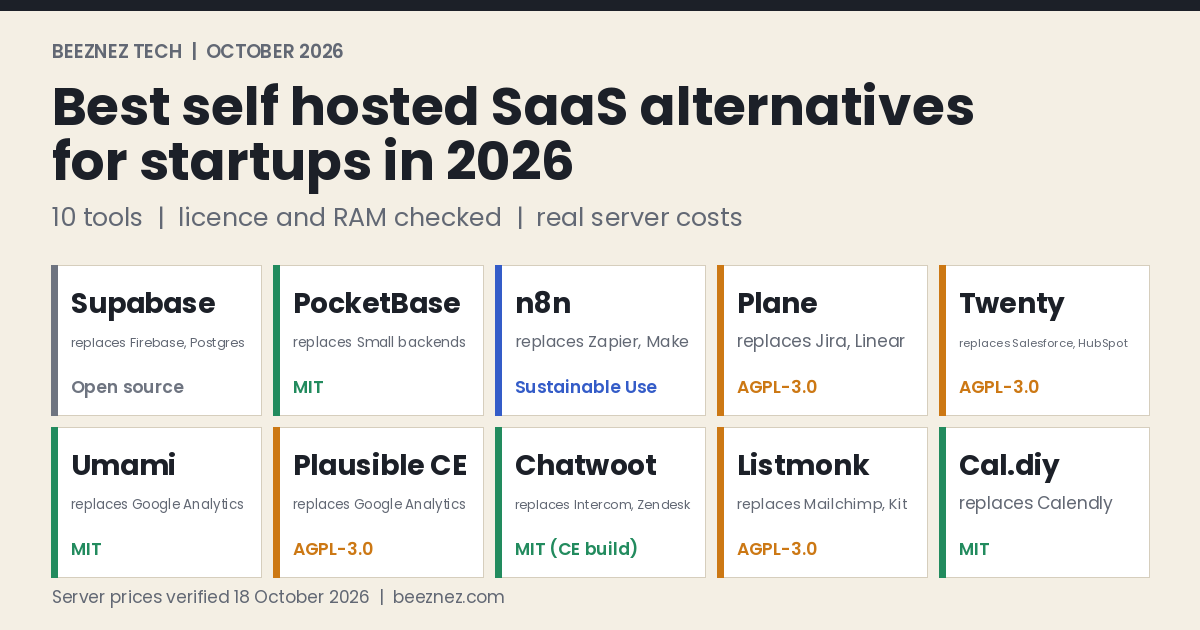
Best Self Hosted Software List 2026: 10 Tools at a Glance
“Replaces” names the SaaS category the tool competes with. “Reported minimum” is the smallest server the source recommends for production, and it is a floor, not a guarantee.
| Tool | Replaces | Licence | Reported minimum |
|---|---|---|---|
| 1. Supabase | Firebase, hosted Postgres backends | Open source | 4 GB RAM, 8 GB+ recommended (official docs) |
| 2. PocketBase | Firebase, small backends | MIT | Runs on a very small VPS |
| 3. n8n | Zapier, Make | Sustainable Use License | 4 GB for production |
| 4. Plane | Jira, Linear, ClickUp | AGPL-3.0 | 2 vCPU and 4 GB (Docker guide), 8 GB recommended |
| 5. Twenty | Salesforce, HubSpot CRM | AGPL-3.0 | Postgres, Redis, server and worker (no official RAM figure found) |
| 6. Umami | Google Analytics, paid privacy analytics | MIT | About 400 MB idle, 2 GB VPS |
| 7. Plausible CE | Google Analytics, Plausible Cloud | AGPL-3.0 | At least 2 GB, about 1.8 GB idle |
| 8. Chatwoot | Intercom, Zendesk | MIT (Community build) | 4 GB (official docs) |
| 9. Listmonk | Mailchimp, Kit | AGPL-3.0 | About 512 MB idle plus Postgres |
| 10. Cal.diy | Calendly | MIT | Next.js and Postgres, built from source |
How to Lower Cloud Costs With Self Hosted Software (and When You Can’t)
Self-hosting changes the shape of your bill. A SaaS charges per seat, per subscriber or per event, so cost grows with usage. A server is a flat monthly fee, so cost stays level until you outgrow the machine. That is the whole saving. It only appears once your SaaS bill is higher than the server bill plus the value of the time you spend running it.
Here is what the server side costs. Prices are list prices, with provider backups added at 20% of the server price, and euro prices converted at about $1.12 per euro, the rate used in my n8n guide. Hetzner raised its cloud prices twice in 2026, on 1 April and 15 June, so check its page before ordering. For how hosting, domain and renewal costs add up on a typical website, see the line-by-line cost of running a WordPress website.
| Server | Spec | Monthly price | With 20% backups |
|---|---|---|---|
| DigitalOcean Basic | 1 vCPU, 2 GiB | $12 | $14.40 |
| DigitalOcean Basic | 2 vCPU, 4 GiB | $24 | $28.80 |
| Hetzner CPX22 | 2 vCPU, 4 GB | €19.99 (about $22.39) | about $26.87 |
| DigitalOcean Basic | 4 vCPU, 8 GiB | $48 | $57.60 |
| Hetzner CPX32 | 4 vCPU, 8 GB | €35.99 (about $40.31) | about $48.37 |
Now the break-even. If a SaaS charges per seat, the number of seats you need before a $28.80 server (the 4 GB DigitalOcean row with backups) is cheaper is $28.80 divided by the seat price. The second row adds two hours of upkeep a month, valued at $40 an hour, which is my assumption and not a measurement. That makes the self-hosted cost $28.80 + $80 = $108.80.
| SaaS price per seat per month | $10 | $19 | $39 | $99 |
|---|---|---|---|---|
| Seats to beat the server alone ($28.80) | 2.9 | 1.5 | 0.7 | 0.3 |
| Seats to beat server plus 2 hours ($108.80) | 10.9 | 5.7 | 2.8 | 1.1 |
Read the second row honestly. At $10 a seat you need about eleven seats before self-hosting pays once your own time has a price. At $99 a seat, one or two seats are enough. Self-hosting is a strong move for expensive per-seat tools and a weak one for cheap ones. It also works best when one server hosts several tools, because the fixed cost is shared. Our shadow AI spend guide shows how to find which subscriptions are actually big enough to be worth replacing.
Three cases where self-hosting does not lower burn at all:
- The SaaS free tier already covers you. Kit’s free plan covers up to 10,000 subscribers, for example, so a self-hosted mailing list saves nothing until you outgrow it.
- The cheap managed plan is cheaper than the minimum server. Supabase Pro starts at $25 a month, while a 4 GB server with backups is $28.80 before you spend a minute on upkeep.
- Nobody on the team owns operations. An unpatched server is a liability, not a saving.
Self Hosted Tools for Startups: 10 Alternatives, One by One
1. Supabase: the Postgres backend
Replaces: Firebase and hosted Postgres backends. Supabase bundles a Postgres database, authentication, file storage, realtime and edge functions, with a Studio dashboard.
Hosting needs: the official Docker guide lists 4 GB of RAM as the minimum for all components, with 8 GB or more recommended, and says you can remove services such as Realtime or Edge Functions to lower the footprint. One tester reported the full stack idling around 1.5 GB on a 4 GB server.
The money: the managed Pro plan is $25 a month and includes a $10 compute credit that covers a small instance, so most early-stage apps sit near $25. A 4 GB server with backups is $28.80, so self-hosting costs more at the start. The case for it is data control, a flat bill once egress and compute grow, or running many projects. One review shows a busy $25 project reaching $97 in a month, which is the kind of variable bill a flat server avoids.
The catch: the project’s docs describe self-hosting as community-supported. You manage upgrades, backups and secrets yourself, and you must turn on row level security on your tables, because a self-hosted instance’s public API key can otherwise read tables that have it switched off.
Skip it if: you are pre-revenue. The free and Pro plans are cheaper than your time.
2. PocketBase: the one-file backend
Replaces: Firebase for small products. PocketBase is a single Go program that gives you an embedded SQLite database, user authentication, file storage, realtime subscriptions, an admin dashboard and a REST API.
Hosting needs: very little. It is reported to run comfortably on a $4 to $6 VPS, and the executable is about 14 MB. Data lives in a folder next to the program, which makes backups simple.
The money: MIT-licensed with no paid tier, so the cost is the server. Because it is so small, it is the best fit on this list for a shared server.
The catch: it is still pre-1.0 (the 0.39 series in mid-2026), and the project warns that backward compatibility is not guaranteed before 1.0. SQLite allows one writer at a time, which limits write-heavy apps, and the project is described as a solo-maintainer effort.
Skip it if: you need a large team, heavy concurrent writes or a guaranteed upgrade path.
3. n8n: workflow automation
Replaces: Zapier and Make. n8n connects apps with visual workflows and AI steps.
Hosting needs: a commonly cited minimum is 1 vCPU and 2 GB, but a 4 GB server is the realistic production floor once PostgreSQL, Docker and the operating system take their share.
The money: n8n Cloud Starter is about €20 a month and Pro about €50 on annual billing, against roughly $28 to $30 in cash for a self-hosted 4 GB setup. At 2,500 executions or fewer, Cloud Starter can cost less than the server. Our true cost of self-hosting n8n guide has a calculator, and the Zapier vs Make vs n8n comparison shows the volume where it wins. To price the same workflows on Make, see the Make.com vs n8n cost comparison. To build something on it, see the no-code AI agent pipeline guide.
The catch: n8n uses the Sustainable Use License, not a standard open-source licence. It allows free use for internal business purposes and for building automations for clients, but not for hosting n8n as a service where clients build their own workflows.
Skip it if: you run a few simple automations. A free tier of a hosted tool is simpler.
4. Plane: project management
Replaces: Jira, Linear, Monday and ClickUp for issues, sprints and roadmaps.
Hosting needs: the Community Edition Docker guide lists at least 2 vCPUs and 4 GB of RAM, with 8 GB recommended. A newer self-host overview, as quoted by a hardware reseller, lists 4 cores, 8 GB and 50 GB of storage. Budget for 8 GB.
The money: AGPL-3.0 with no per-seat licence for the Community Edition, so cost does not rise as you add teammates. That matters if your issue tracker bills per seat.
The catch: it is a multi-service stack and it needs a bigger server than most tools here. Enterprise features sit in paid editions.
Skip it if: your team is two or three people. A free hosted tracker costs nothing and takes no upkeep.
5. Twenty: customer relationship management
Replaces: Salesforce and HubSpot’s CRM. Twenty offers pipelines, custom objects, a REST and GraphQL API and workflow automation.
Hosting needs: a Docker stack of a server, a worker, PostgreSQL and Redis. I did not find an official RAM figure, so plan on a 4 GB server until you have measured it yourself.
The money: AGPL-3.0 with no per-seat licence, so the cost is flat compute however many people use it. Per-seat CRM pricing is where the difference between SaaS and self-hosting is largest, as the break-even table above shows.
The catch: it is a young product. Salesforce and HubSpot still win on marketing automation, integrations and reporting depth.
Skip it if: your sales process relies on a large integration ecosystem you cannot rebuild.
6. Umami: lightweight analytics
Replaces: Google Analytics and paid privacy-friendly analytics.
Hosting needs: a Node application with PostgreSQL or MySQL. One comparison measures about 400 MB of idle RAM for the app plus PostgreSQL and recommends a 2 GB server.
The money: MIT-licensed and free to self-host. It is the lightest tool on this list, so it adds almost nothing to a shared server.
The catch: fewer features than Plausible, and no managed support.
Skip it if: you need advanced funnels, heavy segmentation or large-scale event history.
7. Plausible Community Edition: analytics for bigger sites
Replaces: Google Analytics and Plausible’s own hosted plans.
Hosting needs: Elixir, PostgreSQL and ClickHouse. The prerequisites call for at least 2 GB of RAM, one comparison measures about 1.8 GB idle, and ClickHouse storage grows by roughly 1 GB per million pageviews retained. The host CPU must support SSE 4.2 or NEON.
The money: AGPL-3.0 and free to self-host, but it usually needs a server one size larger than Umami.
The catch: ClickHouse is memory-hungry, and a third-party review notes the company’s long-term plans for the community edition versus its cloud product have been ambiguous.
Skip it if: you only need pageviews and referrers. Umami does that on half the RAM.
8. Chatwoot: customer support inbox
Replaces: Intercom and Zendesk. Chatwoot combines live chat, email and social inboxes with team assignment.
Hosting needs: the official docs call 4 GB of RAM the required minimum, supporting up to about 10,000 conversations a day, with 8 GB for about 20,000. The product’s deploy page lists higher figures, so budget 4 to 8 GB. It also needs PostgreSQL and Redis.
The money: the Community build is MIT-licensed with no agent cap. Chatwoot Cloud is reported at $19, $39 and $99 per agent per month, with a free two-agent tier. Against a $28.80 server, the $19 tier breaks even at about 1.5 agents, which means self-hosting only wins once you pass the free tier.
The catch: make sure you deploy the Community (-ce) build. The standard image bundles an enterprise folder that is licensed for production only with a paid subscription.
Skip it if: you have one or two support agents. The free hosted tier is enough. Compare the options in our solo entrepreneur AI tools guide.
9. Listmonk: newsletters and mailing lists
Replaces: Mailchimp and Kit for newsletters and campaigns.
Hosting needs: a single Go program with PostgreSQL 12 or newer. One hosting guide measured about 512 MB idle for the stack.
The money: AGPL-3.0, with no subscriber cap or paid tier. Self-hosting becomes attractive at large list sizes, where hosted platforms charge per subscriber.
The catch: Listmonk does not send mail itself. You connect an SMTP provider such as Amazon SES, Postmark or Mailgun, so sending is still a paid cost, and you are responsible for email deliverability and authentication records.
Skip it if: your list is under 10,000 subscribers and Kit’s free plan covers you.
10. Cal.diy: scheduling, with a licence warning
Replaces: Calendly. This is the cautionary entry. Cal.com was the obvious self-hosted choice until 15 April 2026, when it moved its production codebase to a private repository and relaunched its free open-source code as Cal.diy under the MIT licence, with enterprise features removed. Cal.com’s own announcement says the community edition is only for self-hosting and use at your own risk.
Hosting needs: a Next.js application on PostgreSQL, built from source. One review noted that the project’s Docker Hub repository had no tags as of 18 August 2026.
The money: free to run, but you carry the build and upgrade work.
The catch: the licence history is the lesson. Alternatives named in the same review include Easy!Appointments (GPL-3.0, PHP and MySQL) and Tymeslot (AGPL-3.0).
Skip it if: a free Calendly-type plan already handles your bookings.
An Open Source SaaS Stack for Business: Three Sample Builds
These are hosting cash costs only, using the backed-up prices from the table above. They exclude your time, email sending, domains and any managed database. The RAM sums are my own arithmetic from reported idle figures, not benchmarks.
| Build | Tools | Server plan | Monthly cash |
|---|---|---|---|
| A. Lean growth | Umami, Listmonk, n8n and PocketBase on one server. Reported idle RAM: 0.4 + 0.5 + 1.75 to 2.75 GB = 2.65 to 3.65 GB, before PocketBase. | One 8 GB server | $48.37 (Hetzner) or $57.60 (DigitalOcean) |
| B. Customer-facing | Chatwoot and Twenty, one 4 GB server each until measured | Two 4 GB servers | $53.74 (Hetzner) or $57.60 (DigitalOcean) |
| C. Product team | Supabase and Plane, one 4 GB server each at the documented minimum | Two 4 GB servers | $53.74 (Hetzner) or $57.60 (DigitalOcean) |
Build A is the one that most often makes sense, because four light tools share one fixed cost. Builds B and C only pay off if the SaaS you would otherwise buy is priced per seat, because each tool needs most of a 4 GB server to itself.
Licence and Maintenance Risk: Open Source Is Not a Guarantee
“Open source” covers very different promises. Check these before you build a business process on any tool above.
- Which licence, exactly. MIT places almost no obligations on you. AGPL-3.0 asks you to share modifications if you offer the software as a network service to others, though internal use does not require publishing anything. n8n’s Sustainable Use License has its own limits. This is general information, not legal advice.
- Whether the licence can change. Cal.com’s 2026 move is the example. A tool can relicense its main product, leaving the free edition as a stripped-down fork.
- Which build you are running. Chatwoot’s Community build is MIT, while its standard image bundles paid enterprise code.
- How stable the project is. PocketBase warns about breaking changes before 1.0, and Supabase calls self-hosting community-supported.
- How you leave. Test an export before you rely on a tool, so a bad release or licence change is an inconvenience and not a crisis.
Security and Upkeep Checklist for a Self-Hosted Stack
A server you run is a server you must defend. This is a minimum, not a full security plan.
- Put everything behind HTTPS with a reverse proxy, and keep database ports closed to the internet.
- Back up, then restore a backup. A backup you have never restored is a hope, not a backup. Provider snapshots at 20% of the server price are a start.
- Update on a schedule. Pull new images and apply operating system patches monthly, and read release notes before major upgrades.
- Lock down sign-ups and defaults. Change default credentials and close open registration on admin tools.
- Turn on row level security if you self-host Supabase.
- Set up email authentication (SPF, DKIM and DMARC) before sending newsletters from Listmonk.
- Keep a written owner. One named person is responsible for updates and backups.
Our WordPress security headers audit shows what checking a server’s own response headers looks like in practice.
Best Self Hosted SaaS Alternatives: Final Thoughts
The best self hosted SaaS alternatives share three traits: a small footprint, a clear licence and a SaaS equivalent that bills per seat or per volume. Umami, Listmonk, PocketBase and n8n fit that profile and combine well on one shared server. Plane, Twenty, Chatwoot and Supabase need more RAM and pay off mainly when seat counts or usage are high. Cal.diy is a reminder that the licence can change underneath you.
If your SaaS spend is still small, stay on free and entry plans and revisit self-hosting when a single tool’s bill passes roughly the cost of a server plus a couple of hours a month. Pair this guide with our build vs buy analysis and the small business AI budget guide when you set the numbers. If you are still choosing an automation platform, this framework for choosing an AI automation tool is a good place to start.
Frequently Asked Questions
What are the best self hosted SaaS alternatives for startups?
For most startups, the strongest picks are Umami for analytics, Listmonk for newsletters, PocketBase or Supabase for backends, n8n for automation, Chatwoot for support, Twenty for CRM and Plane for project management. Choose by licence, RAM needs and whether the SaaS you are replacing charges per seat.
Does self-hosting really lower cloud costs?
Sometimes. It converts a per-seat or per-volume bill into a flat server fee, which saves money when the SaaS is expensive or heavily used. For cheap tools, or ones with generous free tiers, a managed plan is often cheaper once you count your own time.
How much does it cost to host these tools?
A 4 GB server with backups is about $26.87 to $28.80 a month, and an 8 GB server is about $48.37 to $57.60, using the list prices checked on 18 October 2026. Several light tools can share one server.
Is self-hosted software free for commercial use?
Usually, with conditions. MIT tools place almost no limits on you. AGPL tools require sharing modifications if you serve them to others. n8n’s Sustainable Use License allows internal business use and building for clients but not hosting it as a service. Check the licence of the exact edition you deploy.
Can I run all of these on one server?
The lighter ones, such as Umami, Listmonk, PocketBase and n8n, can plausibly share an 8 GB server. Supabase, Plane, Chatwoot and Plausible each want their own 4 GB or larger machine at the documented minimums.
Is self-hosting less secure than SaaS?
It moves the responsibility to you. You control the data, but you must handle patching, backups, access control and monitoring. Without someone to own that work, a managed service is usually safer.
Which self-hosted tool should I try first?
Start with one of the lightest: Umami for analytics, Listmonk for newsletters or PocketBase for a small backend. They need little memory, so you can try one on a small shared server and learn what upkeep really feels like before committing to heavier tools such as Plane, Twenty, Chatwoot or Supabase.
What should I back up on a self-hosted stack?
The database, the configuration and environment files, and any secrets or encryption keys, plus a restore test at least once. A backup you have never restored is only a guess. Provider backups cost extra: this article models them at 20% of the server price.
Can Cal.diy replace Calendly for a business?
Possibly, for an owner who is comfortable running software, but read the licence section first. Cal.com moved its production codebase to a private repository in April 2026, and Cal.diy is the community edition you host yourself under the MIT licence. Check the project’s own documentation for what is and is not included before you rely on it for customer bookings.
Sources
- Supabase, Self-Hosting with Docker: system requirements. Also MakerKit, Supabase pricing and Swyftstack, Supabase pricing explained: Pro plan and billing example. Learn With Hasan, how to self-host Supabase: idle RAM and row level security.
- Toolfreebie, PocketBase review and Webdock, hosting PocketBase: licence, size and pre-1.0 status.
- Beeznez, The True Cost of Self-Hosting n8n: server prices, n8n licence and requirements, verified 18 October 2026.
- Plane self-hosting overview (Mintlify) and ZimaSpace, Plane hardware requirements: Plane licence and requirements.
- Railway, Twenty CRM and Apify, self-hosting Twenty: licence and stack.
- Apify, Plausible vs Umami and SoloDevStack, Umami vs Plausible: licences, RAM and storage growth.
- Chatwoot, self-hosted requirements and Railway, Chatwoot: requirements, Community build licence and cloud pricing.
- Apify, self-hosting Listmonk: AGPL-3.0, PostgreSQL and idle memory.
- Cal.com, v6.4 changelog and Pinggy, self-hosted Calendly alternatives: the April 2026 licence change and alternatives.
- SkillScouter, Kit review: Kit free plan limit.
Published 19 October 2026. Requirements come from a mix of official documentation and third-party guides, several SaaS prices come from a single secondary source, and software licences and prices change. Confirm the licence, requirements and price on each project’s own page before you deploy.
Related reading: The True Cost of Self-Hosting n8n, Zapier vs Make vs n8n, Best AI Tools for Solo Entrepreneurs 2026 and How Much Does an AI Feature Cost?.
Also see: How to Build a No-Code AI Agent Pipeline, Make.com vs n8n: Real Cost at 5K, 25K, and 100K Operations, Small Business AI Budget and WordPress Security Headers: How to Check Yours for the web-server side of upkeep.