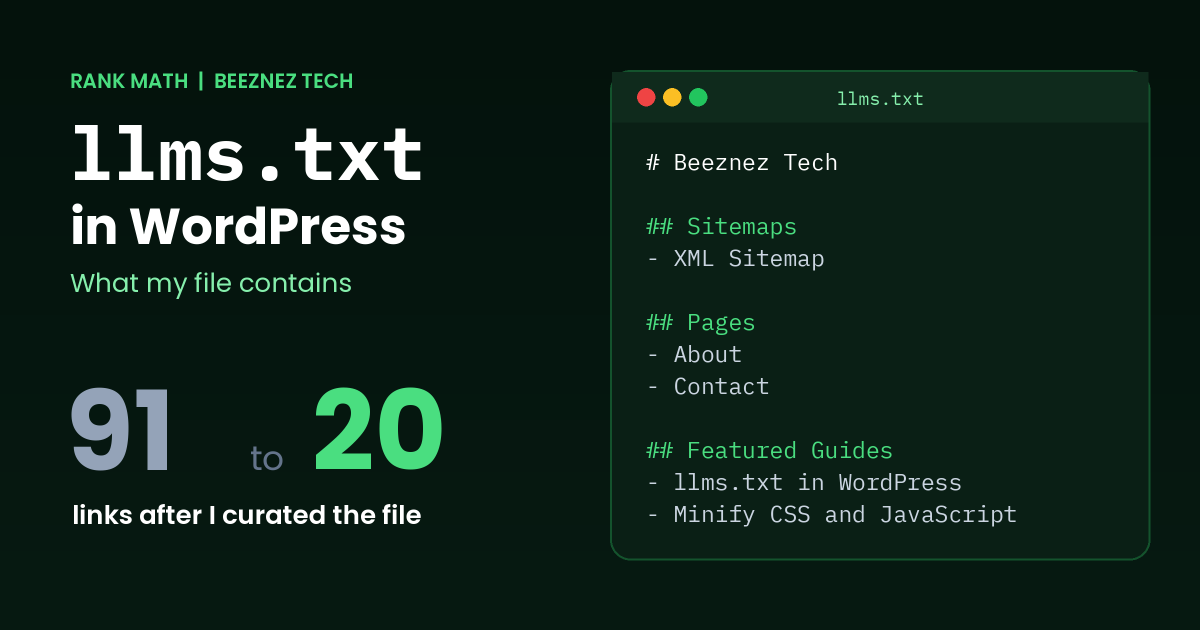
You may have seen llms.txt in WordPress mentioned as the next big thing for AI search. Plugins are adding it as a one-click feature, and many guides promise it will help ChatGPT or Gemini find your content. I wanted to know what it actually does, so I looked at the real file on my own site, Beeznez Tech, which Rank Math generates automatically.
Below you will find exactly what my file contains, five things I noticed about it, what the evidence says about whether AI crawlers read it, and a clear answer on whether llms.txt in WordPress is worth your time.
What Is llms.txt?
llms.txt is a plain Markdown file placed at the root of your website, at yourdomain.com/llms.txt. The idea was proposed by Jeremy Howard in September 2024, and you can read the original proposal at llmstxt.org. The file gives language models a short, curated map of your site: a title, a summary and a list of important pages with one-line descriptions.
It is often called “robots.txt for AI”, but that comparison is misleading. Robots.txt tells crawlers what they may and may not access. An llms.txt file has no power to block or allow anything. It is only a suggestion about what your best content is and where to find it.
llms.txt in WordPress: What My File Contains
I use Rank Math, which includes an llms.txt module. When I opened my own /llms.txt, this is what I found:
| Detail | My file |
|---|---|
| File size | 24,123 bytes |
| Lines | 102 |
| Sections | Site title, Sitemaps, Posts, Pages |
| Links listed | 91 (1 sitemap, 81 posts, 9 pages) |
| Post types included | Posts and pages |
| Entry limit in settings | 100 per post type |
| Taxonomies included | None |
| Custom extra content | None |
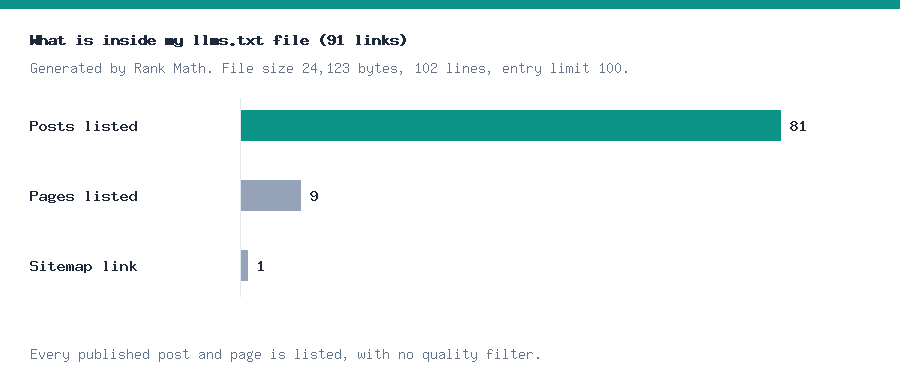
Chart made from my own llms.txt file before I curated it.
The file starts with the site name, then points to the XML sitemap, then lists every published post and page as a Markdown link followed by a short description:
# Beeznez Tech

## Sitemaps
- [XML Sitemap](https://beeznez.com/sitemap_index.xml): Includes all crawlable and indexable pages.

## Posts
- [Post title](post URL): Post description
For comparison, my robots.txt is tiny. It blocks the admin area, allows the AJAX file, and points to the same sitemap. That tells you how different the two files are: robots.txt sets rules, while llms.txt describes content.
5 Things I Noticed About My llms.txt File
1. It lists everything, with no quality filter
By default, Rank Math included all 81 of my published posts and all 9 pages automatically. That sounds convenient, but it means older, thinner posts sit alongside my best articles. If the file is meant to point AI tools to your strongest content, a list of everything is not much of a recommendation. This is one more reason to follow the quality cleanup I described in my guide to E-E-A-T and AI content in 2026.
2. The descriptions come from your meta descriptions
Each entry uses the post’s SEO description. If you have written clear, accurate meta descriptions, your llms.txt file reads well. If you left them blank or generic, the file will be weak. Good descriptions help in three places at once: search results, social sharing and llms.txt.
3. The entry limit applies to each post type
My settings allow 100 entries per post type. I had 81 posts and 9 pages, so I was under the limit. A growing blog will reach it, and when it does, the file stops listing the rest. Check this setting if you publish often.
4. It reflects your current URLs
The file is generated from your live site, so it updates when you publish or change a URL. That is helpful, but check it after any slug change to make sure the links are correct. A quick read of the file after you rename anything takes a minute and catches broken entries.
5. It includes your trust pages
My About, Contact and Privacy Policy pages are listed too. For a small publication that is a good thing, because it shows who is behind the site. If you have private or low-value pages, remove them from the list.
How I Curated My llms.txt in WordPress
Because the default file listed everything, I changed it so it points only to my strongest work. Rank Math has no per-post checkbox for this, so I used two settings. First, I removed Posts from the post types list, which leaves only my 9 pages listed automatically. Second, I added a “Featured Guides” section in the Additional Content box with 10 articles chosen by hand: my hands-on site audits, my E-E-A-T guide, my n8n cost breakdown and three other evergreen guides.
| Detail | Before | After |
|---|---|---|
| File size | 24,123 bytes | 4,628 bytes |
| Lines | 102 | 32 |
| Links listed | 91 | 20 (1 sitemap, 9 pages, 10 featured guides) |
I also noticed that some auto-generated page descriptions were poor. One was only a “Last updated” date, and another had pulled an email address out of the page text. I wrote a short summary for each page so the file now reads cleanly. Read your own file for this kind of problem.
There is a trade-off. New posts no longer appear in the file automatically, so I have to add them by hand when I publish something worth featuring. Rank Math also leaves out posts set to noindex, but that removes them from search too, so I did not use that route.
llms.txt vs robots.txt vs Sitemap: What Each File Does
Site owners often mix these three files up, so here is a simple comparison based on the files on my own site:
| File | Purpose | On my site |
|---|---|---|
| robots.txt | Tells crawlers what they may access | Blocks the admin area, allows the AJAX file, points to the sitemap |
| XML sitemap | Lists every indexable URL for search engines | Generated by Rank Math, linked from both other files |
| llms.txt | Describes your content for language models | 91 links with descriptions, no access rules |
In short, robots.txt controls access, the sitemap helps discovery, and llms.txt in WordPress is only a readable summary. If your goal is to control which AI bots can visit, llms.txt is the wrong tool. Use robots.txt for that.
Does llms.txt in WordPress Actually Work?
This is the question that matters, and the honest answer is: the evidence is weak so far.
- Google: coverage of Google’s 2026 guidance reports that Search does not use llms.txt for ranking or visibility, including in its AI features. Google reportedly said it is fine to keep one for other systems, but it is not required.
- AI companies: as of 2026, major AI companies have not publicly confirmed that their crawlers use llms.txt to choose or cite content.
- Server-log studies: analyses published in 2026 report that most llms.txt files receive no requests from AI crawlers. One twelve-week test across 83 sites, described by Something Inc., found that three of four major crawlers rarely fetched the file, while Meta’s crawler was an exception.
These numbers come from third-party studies, so treat them as indications rather than proof. Support may change, and different systems behave differently. But nothing I found supports the claim that adding llms.txt will boost your rankings or AI citations.
How to Check Whether Bots Request Your File
If you are curious, you can check your own server access logs for requests to /llms.txt. A request shows that a bot fetched the file, but it does not prove the bot used it. On shared hosting, access logs are usually available in your hosting dashboard. I have not analyzed my own bot logs yet, so I cannot tell you who has fetched my file.
How to Set Up llms.txt in WordPress With Rank Math
- Open the Rank Math dashboard and enable the LLMs Txt module.
- Go to Rank Math’s General Settings and open the llms.txt editor.
- Choose which post types to include and set the entry limit.
- Add any extra content, such as a short site summary, if you want one.
- Visit
yourdomain.com/llms.txtand read the result yourself.
Other SEO plugins, including Yoast SEO and All in One SEO, also offer an llms.txt feature, and you can upload a file manually if you prefer. If you are weighing plugins, my look at Rank Math Free vs PRO explains what I use on my own site.
Should You Add llms.txt to Your WordPress Site?
My view is that the cost is low and the risk is low, so there is no strong reason to avoid it, but there is no strong reason to expect results either. Here is how I would decide:
- Add it if your SEO plugin makes it a one-click setting and you will take five minutes to review the output.
- Edit it if your site has thin or outdated pages that you would not want an AI tool to treat as important.
- Do not rely on it as an AI visibility strategy. Original content, clear structure and accessible pages matter far more.
- Never put private information in it. The file is public, like robots.txt.
Common Mistakes With llms.txt in WordPress
- Treating it as robots.txt for AI. It cannot block or allow any bot.
- Believing it improves rankings. No major search engine has said it does.
- Never reviewing the output. Auto-generated files can include pages you would rather not feature.
- Ignoring meta descriptions. They become the descriptions in your file.
- Forgetting the entry limit. It applies per post type, and a growing site can outgrow it.
Quick Checklist
- Open
/llms.txton your site and read the whole file. - Check that every listed URL loads correctly.
- Remove thin, outdated or private pages from the list.
- Improve weak meta descriptions.
- Check the entry limit against your post count.
- Review your robots.txt separately for access rules.
- Do not expect traffic from the file alone.
Frequently Asked Questions
What is llms.txt in WordPress?
It is a Markdown file at the root of your site that lists your key pages with short descriptions, intended to help language models understand your content. SEO plugins such as Rank Math can generate it automatically.
Does llms.txt help SEO?
No evidence shows that it does. Google has said Search does not use it for ranking, and most studies find that it is requested rarely by AI crawlers.
Is llms.txt the same as robots.txt?
No. Robots.txt sets access rules for crawlers. llms.txt only describes your content and cannot block or allow anything.
Is it safe to enable llms.txt in WordPress?
Generally yes, because it only publishes information that is already public. Just review the output so you do not feature pages you would rather keep low profile.
How do I see my llms.txt in WordPress?
Type your domain followed by /llms.txt into your browser. If your SEO plugin has the feature enabled, the file will appear as plain text.
Final Thoughts
After reading my own file, my view of llms.txt in WordPress is calm and practical. It is a tidy, low-effort summary of your site that costs almost nothing to publish, but there is no good evidence yet that AI tools or search engines reward it. Enable it if your plugin makes it easy, review what it lists, and spend your real effort on the content and trust signals that clearly do matter.
Related reading: another way to tell search engines about your pages is covered in Rank Math Instant Indexing, and why Google may still not know them in URL Is Unknown to Google.