If you see URL is unknown to Google next to your pages, it can feel like the worst possible verdict. You wrote the article, published it, and Google apparently has no idea it exists. I saw exactly this on my own site, Beeznez Tech, when I opened the Index Status tab in Rank Math: 63 of the 68 pages it had inspected carried that label.
Below you will find what the status means, the real numbers from my site, the technical checks I ran to make sure nothing was blocking Google, and six steps to get new pages discovered. I also explain what this means for ranking, because it changes how you should think about keywords.
What Does “URL Is Unknown to Google” Mean?
It is a page status in Google Search Console’s URL Inspection tool. According to Google’s own URL Inspection documentation, it means Google has not seen that URL before. Google’s suggested fix is to run a live inspection, check that the page is available, and then submit it for indexing.
The status is not a penalty. It says nothing about the quality of the page or any rule you broke. It simply describes where the page sits in Google’s pipeline: not yet discovered. Rank Math shows the same wording in its Index Status tab because it reads the information from Google’s inspection data.
One caution: some SEO researchers argue that this label is not always accurate. An analysis by Indexing Insight reports that pages Google had seen before can also show it. So treat the label as a strong signal that a page has little standing with Google right now, not as proof that Google has never touched it.
URL Is Unknown to Google: What My Rank Math Data Showed
Rank Math’s analytics screen already hinted at the problem. My Analytics dashboard showed an overall optimization score of 87, with 101 pages rated good, 2 fair and none poor. But it also showed total impressions as n/a, total keywords as n/a, and zero keywords in every position bucket. Search traffic was 14 visits over the last 30 days, down 6.
The Index Status data explained why:
| Index status | URLs |
|---|---|
| URL is unknown to Google | 63 |
| Discovered – currently not indexed | 4 |
| Crawled – currently not indexed | 1 |
| Reported as indexed | 0 |
| Total inspected | 68 |
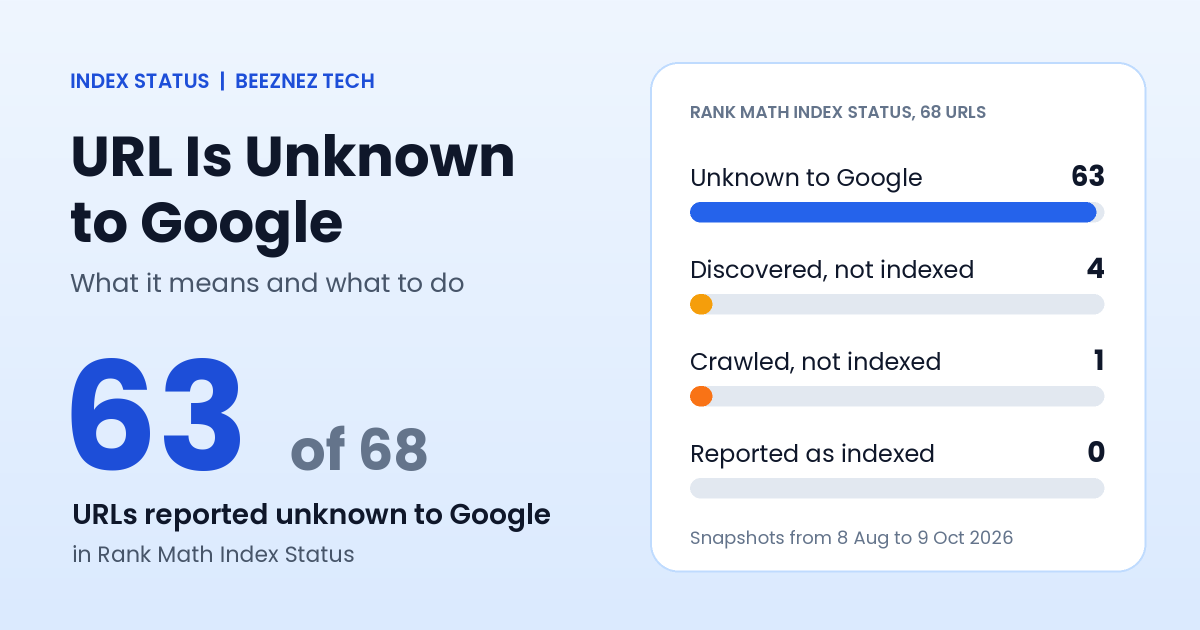
Rank Math Index Status results for the 68 URLs inspected on my site.
Two details matter. First, these are snapshots taken on different days between 8 August and 9 October 2026, with 29 of them checked on 9 October, so some may be out of date. Second, the four pages marked “Discovered – currently not indexed” were my About, Contact, Terms, and Disclaimer pages, checked back in August. Google had found those, but had not yet crawled them.
My Search Console connection itself was healthy. Rank Math reported the property as verified and the sitemap as detected. Yet the table of Search Console query data inside Rank Math contained zero rows. That is why impressions and keywords showed n/a: Google had not returned any search data because, as far as I can tell, the pages were not yet appearing in search results.
How to Find Out If a URL Is Unknown to Google in Rank Math
You can see this status without leaving WordPress. Open Rank Math SEO, go to Analytics, and choose the Index Status tab. For it to work, your Google account must be connected, your Search Console property must be verified, and the index status option must be switched on in Rank Math’s analytics settings. Rank Math then asks Google about your URLs and stores the answer for each one.
Look at the date of each check as well as the status. Mine had been run on several different days, so a page showing that a URL is unknown to Google in an August snapshot may have changed since. For a final answer on any single page, paste it into the URL Inspection tool in Search Console, which reads Google’s current data.
Why This Matters More Than Your SEO Score
My pages scored well. Rank Math rated 101 of 103 items as good, and I wrote about this gap in my article on Rank Math Free vs PRO. An SEO score checks on-page basics. It cannot make Google discover a page.
This is also why picking a keyword does not help on its own. A page that Google has not indexed cannot rank for any keyword at any position, however well it is optimized. Indexing comes first, ranking second. On my site, the keyword positions stayed at zero not because the keywords were wrong, but because there was nothing in the index to rank.
Technical Checks: Is Anything Blocking Google?
Before blaming Google, I checked whether my own site was getting in the way. Here is what I verified:
| Check | Result on my site |
|---|---|
| WordPress search engine visibility | Not blocked (the discourage setting is off) |
| Robots meta tag on an article | follow, index |
| Canonical tag | Points to the page’s own URL |
| Post sitemap | Loads normally with 85 URLs, newest updated 9 October |
| Posts set to noindex | 1 out of 84 |
| Internal links on the homepage | 29 |
Nothing technical was stopping Google. That is useful, because it means the remaining cause is discovery and priority, not a mistake I need to undo. If you see URL is unknown to Google on a site that does have a noindex tag or a blocking rule, fix those first.
6 Fixes When a URL Is Unknown to Google
1. Rule out blockers first
Check the three things above: the site-wide visibility setting, the page’s robots meta tag, and the canonical URL. Also confirm the page loads with a normal 200 status and is not behind a login. This takes five minutes and prevents wasted effort.
2. Submit a clean sitemap
Your sitemap is how you list every page you want found. Submit it in Search Console following Google’s guide to building and submitting a sitemap, and make sure it lists only pages you actually want indexed. A sitemap helps discovery but does not guarantee indexing.
3. Inspect and request indexing for your key pages
Paste a priority URL into the URL Inspection tool, run the live test, and click Request Indexing. One request is enough. Repeating it does not speed anything up, and there is a daily limit, so use it on your best pages rather than all of them.
4. Link to new pages from pages Google already knows
Google finds most pages by following links. Add links from your homepage, your blog index and relevant older articles, as I did when I tidied my 404 errors and redirects. A page with no internal links is easy to ignore.
5. Give Google a reason to index each page
Pages that are discovered but not indexed are often thin or similar to others. Add something only you can offer: your own measurements, screenshots and opinions. This is the same standard I describe in my guide to E-E-A-T and AI content.
6. Earn discovery from outside, then be patient
Links and mentions from other sites help Google find you. After that, indexing can take days to weeks for a new site, and it is not guaranteed. Recheck the Rank Math Index Status tab and Search Console’s Pages report every week or two instead of daily.
A Note on Rank Math’s Instant Indexing
Rank Math includes an Instant Indexing module, and it is active on my site. As far as I know, it is built around IndexNow, a protocol that some search engines use but that Google does not take part in. So it should not be relied on to get a page into Google. Check the module’s current documentation before expecting it to replace a manual request in Search Console.
Common Mistakes
- Panicking about the label. It describes status, not punishment.
- Requesting indexing over and over. One request per URL is enough.
- Chasing keywords before indexing. An unindexed page cannot rank.
- Publishing thin pages quickly. More unknown URLs does not help. Fewer, stronger pages do.
- Trusting an old snapshot. Re-inspect the URL in Search Console before drawing conclusions.
- Blocking the site by accident. Check the visibility setting after any migration or staging work.
Quick Checklist
- Confirm the page loads and has no noindex tag.
- Confirm the canonical URL points to itself.
- Submit a clean sitemap in Search Console.
- Request indexing for your best pages, once each.
- Add internal links from your homepage and older articles.
- Improve thin pages with original data.
- Recheck Index Status every week or two.
Frequently Asked Questions
Is “URL is unknown to Google” bad?
It is not a penalty. It means Google has not discovered or does not yet recognize the page. For a new site, it is common.
How long until Google indexes a new page?
It varies from days to several weeks, and low-authority sites often wait longer. Google does not promise to index every page.
Should I request indexing for every URL?
No. Use the request for your most important pages and rely on your sitemap and internal links for the rest.
Why does Rank Math show n/a for impressions and keywords?
Those figures come from Search Console data. If Google has not shown your pages in search results, there are no impressions or keywords to display, even when the connection works.
Can I rank for a keyword if my URL is unknown to Google?
No. A page must be indexed before it can appear in results for any keyword.
Final Thoughts on ‘URL is unknown to Google‘
When a URL is unknown to Google, the first job is not to optimize harder. It is to confirm nothing is blocking the page, help Google discover it, and give it a reason to be indexed. On my site, 63 of 68 inspected URLs were in that state while every on-page score looked healthy, which is a useful reminder that a green score and a ranking are two different things. I will recheck my Index Status after requesting indexing for my strongest articles and share the result.
Related reading: if you are wondering whether a plugin can speed this up, read Rank Math Instant Indexing: Does It Work for Google?. To make sure the pages you publish get discovered, see how I fixed orphan pages in WordPress with internal links.