By Md Abdur Rouf Mia | Updated 13 October 2026 | Prices verified 13 October 2026
For five people, ChatGPT Business on annual billing costs exactly the same as five Plus subscriptions, $100 a month, but adds admin controls, a shared workspace and business data defaults. Paying monthly costs $125 a month for the same seats. Plus only wins if you genuinely do not need central billing or data controls. And in a ChatGPT Plus vs Team comparison, there is a catch: OpenAI renamed ChatGPT Team to ChatGPT Business on 29 August 2025. It is a name change, not a different product, so any article that prices Team and Business separately is working from old information.
ChatGPT Plus vs Team vs Business: The Short Answer
In a ChatGPT Plus vs Team decision for five people, this is which plan fits each situation:
| Your situation | Best fit |
|---|---|
| All five use ChatGPT daily, and you want one invoice and admin visibility | Business, annual billing, same price as Plus |
| Only two or three people are heavy users | Hybrid: 2 Business seats plus free accounts for the rest |
| One or two power users, three light users | Business with mixed seats (1 or 2 Premium, the rest Standard) |
| Contractors or freelancers with no shared data | Five Plus subscriptions |
| More than 200 seats, or procurement needs a negotiated contract | Enterprise, quote only |
Prices verified 13 October 2026 against chatgpt.com/pricing and OpenAI’s Business help documentation.
The Three Plans in the ChatGPT Plus vs Team Comparison
One clarification before the table, because it is the most common source of confusion in this decision: there is no separate “ChatGPT Team” plan any more. OpenAI’s own rename FAQ says the Team plan became ChatGPT Business as of 29 August 2025, with features, pricing and limits unchanged at the time. What genuinely exists at the top end is two seat types inside Business, and that is the real choice worth making.
| Plus | Business Standard seat (the old Team) | Business Premium seat | |
|---|---|---|---|
| Price per user per month | $20 | $25 monthly or $20 annual | $125 monthly or $100 annual |
| Annual billing | Not offered | Yes | Yes |
| Seats per workspace | 1 | 2 to 200 | 2 to 200 (counts toward the same limit) |
| Admin controls and central billing | No | Yes | Yes |
| Shared workspace | No | Yes | Yes |
| Training on your data | Content may be used unless you opt out | Not used by default | Not used by default |
| Usage limits | Standard | Standard | 5x Standard, no 5-hour limit |
| Extra usage | Not applicable | Workspace credits | Workspace credits |
Enterprise is quote only. OpenAI does not publish a price, so treat any figure you see for it as an industry estimate, not a list price.
The headline finding in that table: at $20 per user per month billed annually, a Business Standard seat costs exactly what a Plus seat costs. You are not paying a premium for admin controls or a shared workspace. You pay a premium only if you choose monthly billing, which adds $5 per seat.
ChatGPT Plus vs Team: Monthly and Annual Cost for 5 People
Five Plus subscriptions
$20 x 5 = $100 a month, $1,200 a year. Plus has no annual option, so there is no discount to chase. Over three years the total is $3,600.
The old Team plan at 5 seats
This is Business Standard on monthly billing, which is what Team customers paid. $25 x 5 = $125 a month, $1,500 a year. Over three years that is $4,500, which is $900 more than Plus for the same per-seat capability.
Business at 5 seats on annual billing
Same five seats, billed annually: $20 x 5 = $100 a month, $1,200 a year. Over three years: $3,600, identical to Plus.
Mixing in a Premium seat raises the cost sharply. One Premium plus four Standard on annual billing is $100 + $80 = $180 a month, $2,160 a year, or $6,480 over three years. On monthly billing it is $225 a month and $8,100 over three years. Premium is a big step up in any ChatGPT Plus vs Team budget, and it is only worth it for the person whose work genuinely stops when they hit limits.
The hybrid setup most small teams should consider
Here is where the ChatGPT Plus vs Team arithmetic gets interesting, and where most guides stop short. Business needs at least two paid seats, so the smallest viable workspace is two seats and everything beyond that is optional. For a five-person team where only two people are heavy users:
2 Business Standard seats plus 3 free accounts, annual billing: $40 a month, $480 a year, $1,440 over three years.
That is $2,160 cheaper over three years than putting all five people on Plus, and you still get the shared workspace, admin controls and business data defaults for the work that matters.
A middle option is 2 Business seats plus 3 Plus seats on annual billing: $40 + $60 = $100 a month. That matches the all-Business three-year total of $3,600, but with fragmentation: three people sit outside the workspace, their conversations are not covered by business data terms, and you reconcile three separate consumer subscriptions.
My recommendation for the typical five-person team is all-Business on annual billing at $100 a month. You get the workspace, the controls and the data terms for the same money as Plus, and you avoid splitting users across two systems. Choose the hybrid only when the number of paid seats is the binding constraint on your budget, not capability.
ChatGPT Plus vs Team: What You Are Buying Beyond Features
Admin and billing controls
On Business, a workspace owner buys seats and assigns them to members. A seat is paid capacity, separate from the person using it. You can reassign a seat when someone leaves, see usage across the workspace, and manage everything on one invoice with one payment method.
On Plus, each person manages their own subscription and their own credit card. For a five-person team that means five invoices, five renewal dates and five people who cannot easily be offboarded when they leave. That last point matters more than the $0 price difference suggests.
Data handling and training defaults
This is where the ChatGPT Plus vs Team data defaults genuinely diverge, so I am going to stick to what OpenAI states rather than what it implies.
OpenAI’s published position is that business data is excluded from training by default. That applies to ChatGPT Business, Enterprise, Edu and the API platform, and you can read the commitment on OpenAI’s enterprise privacy page and its business data page.
Consumer plans differ. On Free, Go and Plus, OpenAI’s data controls documentation says content may be used to improve models unless you opt out, which you can do in ChatGPT under Settings, then Data controls. So if your team uses five separate Plus accounts for work, the default is the opposite of what Business gives you.
On retention, check your own workspace settings before you rely on a specific figure. Retention is something an admin configures, not a single fixed policy, and plans change.
One nuance worth knowing: Zero Data Retention is a separate commitment that applies to eligible API endpoints, not to ChatGPT Business browser sessions. They are different products with different guarantees.
I am not going to tell you this makes you compliant with anything. Whether these defaults satisfy your obligations depends on your jurisdiction, your sector and your contracts. Check with your own legal or compliance advisor once, and ask four plain questions: does our data leave the workspace, who can access it, how long is it retained, and what is our documented opt-out? Those matter more than any plan comparison.
Shared workspace and collaboration
In the ChatGPT Plus vs Team workspace question, Business gives your team a shared space with role-based access and usage visibility, plus the ability to share internal assistants. Plus gives each person an isolated account. For a team building shared prompts, templates and internal assistants, that is the difference between one team tool and five individual tools that happen to be the same product.
The minimum-seat wrinkle
Two seats is the floor. You cannot buy a single Business seat, which is why the “one Team seat and everyone else on free accounts” plan you will see recommended online does not work. The closest legitimate version is two Business seats plus free accounts, and it does work well, as the hybrid math above shows. But you are committing to two paid seats whether or not the second person needs one. At the other end, new Business workspaces top out at 200 seats.
ChatGPT Plus vs Team: The 3-Year Cost Comparison
Assumptions
For this ChatGPT Plus vs Team cost comparison, assume five people, all heavy enough to need a paid seat. Prices are today’s published prices held flat for 36 months, which is an assumption, not a forecast. OpenAI has changed both prices and plan structures before, and Business was repriced to its current $25 and $20 rates in 2026. Every row shows the monthly-equivalent rate so the rows are comparable.
The table
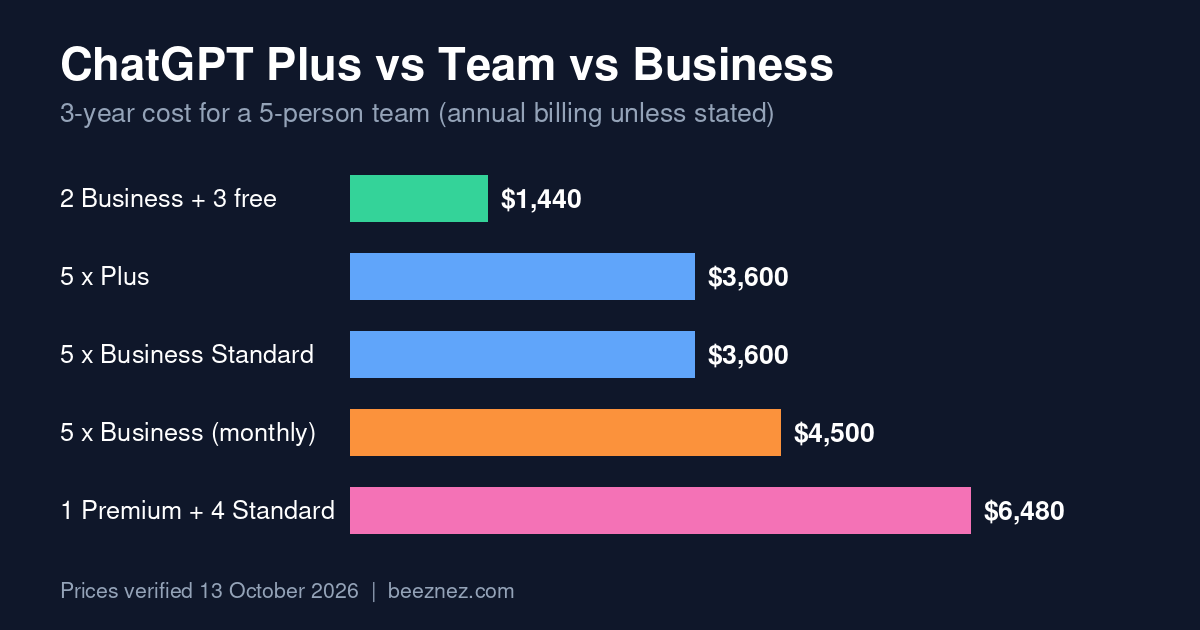
| Setup (5 people) | Per month | Per year | 3-year total |
|---|---|---|---|
| 5 x Plus (monthly only) | $100 | $1,200 | $3,600 |
| Business, 5 Standard, annual | $100 | $1,200 | $3,600 |
| Business, 5 Standard, monthly (the old Team) | $125 | $1,500 | $4,500 |
| Hybrid: 2 Business annual + 3 free | $40 | $480 | $1,440 |
| Hybrid: 2 Business monthly + 3 free | $50 | $600 | $1,800 |
| Hybrid: 2 Business annual + 3 Plus | $100 | $1,200 | $3,600 |
| Business mixed: 1 Premium + 4 Standard, annual | $180 | $2,160 | $6,480 |
| Business mixed: 1 Premium + 4 Standard, monthly | $225 | $2,700 | $8,100 |
Break-even point between plans
There is no break-even in the traditional ChatGPT Plus vs Team sense, and that is the finding worth remembering. Because a Business Standard seat on annual billing costs $20, the same as Plus, the two options cost the same at every seat count from the first day. Two people: $40 either way. Ten people: $200 either way. There is no volume threshold where Business “becomes worth it”. It is worth it on day one, or it depends only on whether you need the controls.
The only genuine break-evens are:
- Business monthly vs annual: annual wins immediately, saving $60 per seat per year. Whatever you decide on ChatGPT Plus vs Team, there is little reason to pay monthly if you are confident of a 12-month horizon.
- All-Business vs the 2-seat hybrid: the hybrid saves $2,160 over three years for five people and $5,760 for ten. The break-even is behavioural, not financial: it depends on whether the free-tier users can work without hitting limits or needing workspace features.
- Premium vs Standard: a Premium seat costs five times a Standard seat. It is justified only where one person’s blocked time costs the business more than the extra $80 a month.
Common Setups in a ChatGPT Plus vs Team Decision
Three-year totals, annual billing where available, same flat-price assumption.
2 seats
| Setup | 3-year total |
|---|---|
| 2 x Plus | $1,440 |
| 2 x Business Standard, annual | $1,440 |
| 2 x Business Standard, monthly | $1,800 |
In the ChatGPT Plus vs Team comparison at two seats, Plus and annual Business cost the same, so take Business for the controls. The hybrid is not available here because you are already at the two-seat minimum.
5 seats
| Setup | 3-year total |
|---|---|
| 5 x Plus | $3,600 |
| 5 x Business Standard, annual | $3,600 |
| 5 x Business Standard, monthly | $4,500 |
| 2 x Business + 3 free | $1,440 |
| 1 Premium + 4 Standard, annual | $6,480 |
10 seats
| Setup | 3-year total |
|---|---|
| 10 x Plus | $7,200 |
| 10 x Business Standard, annual | $7,200 |
| 10 x Business Standard, monthly | $9,000 |
| 2 x Business + 8 free | $1,440 |
| 5 x Premium + 5 Standard, annual | $21,600 |
At ten seats the monthly-versus-annual decision becomes obvious: choosing monthly over annual costs an extra $1,800 across three years, for no benefit beyond flexibility. The Premium row shows how fast costs climb: five Premium seats alone are $500 a month before you add a single Standard seat.
Mixed: heavy users on paid, light users on free
In a ChatGPT Plus vs Team budget, this is the setup I would push back on most. It looks frugal and creates real costs:
- Fragmentation. Work moves between the workspace and personal accounts, so your data handling story has holes in it.
- Limits arriving mid-project. Free accounts hit caps. Go at $8 a month raises them but is still a consumer plan, not Business.
- Shadow subscriptions. Someone buys Plus on a personal card and now you are reconciling expenses nobody authorised. I covered how to catch this in Shadow AI Spend: How to Find It Before It Drains Your Budget.
For genuinely occasional users, someone who opens ChatGPT twice a week, free or Go is defensible. For anyone whose output lands in client work, get them inside the workspace.
ChatGPT Plus vs Team: Which Plan Should You Pick?
Solo or 2 to 3 people
Solo: Plus at $20 a month. If you keep hitting limits, Pro tiers start at $100 a month. There is no reason to look at Business unless you specifically need its data terms, because you cannot buy a single seat anyway.
Two or three people: Business on annual billing. At two seats the ChatGPT Plus vs Team choice is a tie: it costs exactly the same as two Plus subscriptions and gives you the workspace and controls. At three seats it still costs the same, and now you are a team with shared assistants rather than three separate accounts.
4 to 10 people
Business on annual billing, Standard seats, for everyone who uses it meaningfully. That is the usual ChatGPT Plus vs Team answer at this size. At this size the workspace pays for itself in offboarding alone: one place to revoke access. For a ChatGPT Plus vs Team decision at this size, add Premium seats for the one or two people who are genuinely blocked by limits, not as a default. Consider the 2-seat hybrid only if several people are marginal users.
Larger teams and procurement
If you are heading past 200 seats, or your procurement or legal team needs a negotiated contract, talk to OpenAI about Enterprise. Expect a quote process and an annual commitment, and bring your security questionnaire. You will need it whichever plan you choose.
Costs Teams Forget
Seat sprawl and unused licences
Business seats are paid capacity, not people. Buy five and assign four, and you pay for five. Audit assignments quarterly: a five-person team carrying two unused Standard seats for a year burns $480 for nothing. Reassigning a seat when someone leaves takes minutes, and teams routinely forget to do it for months.
Credits and API usage on top
Two separate meters sit outside your seat price:
- Workspace credits for Business, which extend usage beyond the included rate limits. Budget these like a utility, not a subscription.
- API usage, which is billed entirely separately and does not touch your subscription. If your team builds anything on the API, that is a new line item.
Premium seats reduce the need for credits but do not remove it, since Premium has higher limits, not infinite ones.
Other tools your team will ask for next
ChatGPT will not be the last subscription request. A five-person team building with AI will also field requests for a coding assistant, a transcription tool, a writing or research tool and an automation platform. Each is cheap alone and significant together, and it sits on top of whatever you decide in the ChatGPT Plus vs Team choice, so check for overlap before you add them. For a method, see How to Choose the Right AI Automation Tool for Your Business.
And if you plan to automate work rather than just generate text, the cost looks completely different, because token consumption behaves nothing like per-seat pricing. How Much Does It Cost to Run an AI Agent Every Month? breaks that down, and How Much Does an AI Feature Cost? A Framework for Founders covers the budgeting side.
The Bottom Line on ChatGPT Plus vs Team vs Business
The ChatGPT Plus vs Team question has a simpler answer than most guides suggest. Team is now Business, a Standard seat on annual billing costs the same $20 as Plus, and monthly billing is the only thing that makes it more expensive. For a five-person team that all use ChatGPT for work, Business on annual billing at $100 a month is the default I would start from. If only two people really need it, two Business seats at $40 a month is the cheapest setup that still gives you the workspace. Before you commit, re-check the live pricing page, because both prices and plan names have moved recently.
Frequently Asked Questions
Is ChatGPT Team worth it for a small team?
The question has changed shape, because Team no longer exists as a separate plan. It was renamed ChatGPT Business on 29 August 2025, and on annual billing a Business Standard seat costs $20 a month, the same as Plus. For a small team that uses ChatGPT for work, it is worth it on day one: you get admin controls, a shared workspace and business data defaults for the price of Plus.
What is the minimum number of users on ChatGPT Team?
Two. A Business workspace needs at least two seats, which can be two Standard, two Premium or one of each. You cannot buy a single seat, so the “one paid seat plus free accounts” setup is not available.
How much does ChatGPT cost per user per month?
Free is $0, Go is $8 and Plus is $20. Business Standard is $25 monthly or $20 annually, and Business Premium is $125 monthly or $100 annually. Pro tiers start at $100 a month. Enterprise is quote only. Prices verified 13 October 2026.
Does the Team plan train on our data?
OpenAI states that business data is excluded from training by default, covering ChatGPT Business, Enterprise, Edu and the API. On consumer plans, content may be used to improve models unless you opt out under Settings, then Data controls. Read OpenAI’s own pages for the current policy and check your workspace settings.
ChatGPT Plus vs Team: what is the real difference?
On annual billing the price is identical. The difference is everything around it: a shared workspace, seat assignment and reassignment, central billing, usage visibility, spend controls and business data defaults instead of consumer ones. If your team uses ChatGPT for work output, those are the reasons to move. If it is five people using it as a personal productivity tool, Plus is fine.
Sources
- ChatGPT pricing page (OpenAI), accessed 13 October 2026
- ChatGPT Business overview (OpenAI Help Center), accessed 13 October 2026
- ChatGPT Business rename FAQ (OpenAI Help Center), accessed 13 October 2026
- Premium seats are coming to ChatGPT Business (OpenAI), accessed 13 October 2026
- Enterprise privacy (OpenAI) and Data controls FAQ (OpenAI Help Center), accessed 13 October 2026
Prices verified 13 October 2026. OpenAI changes plan structures and pricing periodically, and the Team-to-Business rename is recent proof. Check the live pages before you commit or cite these figures. The three-year totals are arithmetic on list prices held flat, not a forecast.
See also: Small Business AI Budget: What a 5-Person Team Actually Spends Each Month for the full monthly stack.
See also: To compare ChatGPT against the other two major assistants, and to run a free five-scenario test yourself, see ChatGPT vs Claude vs Gemini for Business (2026 Guide).